 Servflow
 Kofo Okesola
About a third of my working week now runs without me:
- Inbound research. An agent reads every signup and tells me who they are before I reply.
- Lead search. Another finds companies that look like my best customers and drops them in a sheet with a reason.
- PR review. One reviews pull requests on my repositories.
- Assistants. Two more answer questions on Telegram and Slack.
None of this is new technology. What took me a while was finding the right place to build it. I started in Zapier, moved to n8n to self-host, and both worked until the model in the middle wanted to decide things and the tool wanted a fixed list of steps. That gap is why I built ServFlow, and why I get asked "n8n or Zapier for AI agents?" so often. The honest answer is: it depends on whether the model picks the next step.
Already know the difference between an agent and a workflow? Skip to the list.
What is an AI agent builder?
An AI agent builder makes a program where the model decides what to do next. You give it a goal, a set of tools, and context. It reads, decides whether to call a tool, reads the result, and decides again until it has an answer.
The builder's job is everything around that loop:
- Entry. How a request arrives: HTTP, a schedule, a chat message, a webhook.
- Tools and guards. What the model may call, and the limits on each tool.
- Memory. What the agent keeps between runs and across a thread.
- Trace. How you see the path it took afterwards.
The trace matters more than it sounds. My inbound agent can take four different paths for four signups and be right every time. The output alone does not tell me whether it did what I intended.
AI agent builder vs workflow automation tool
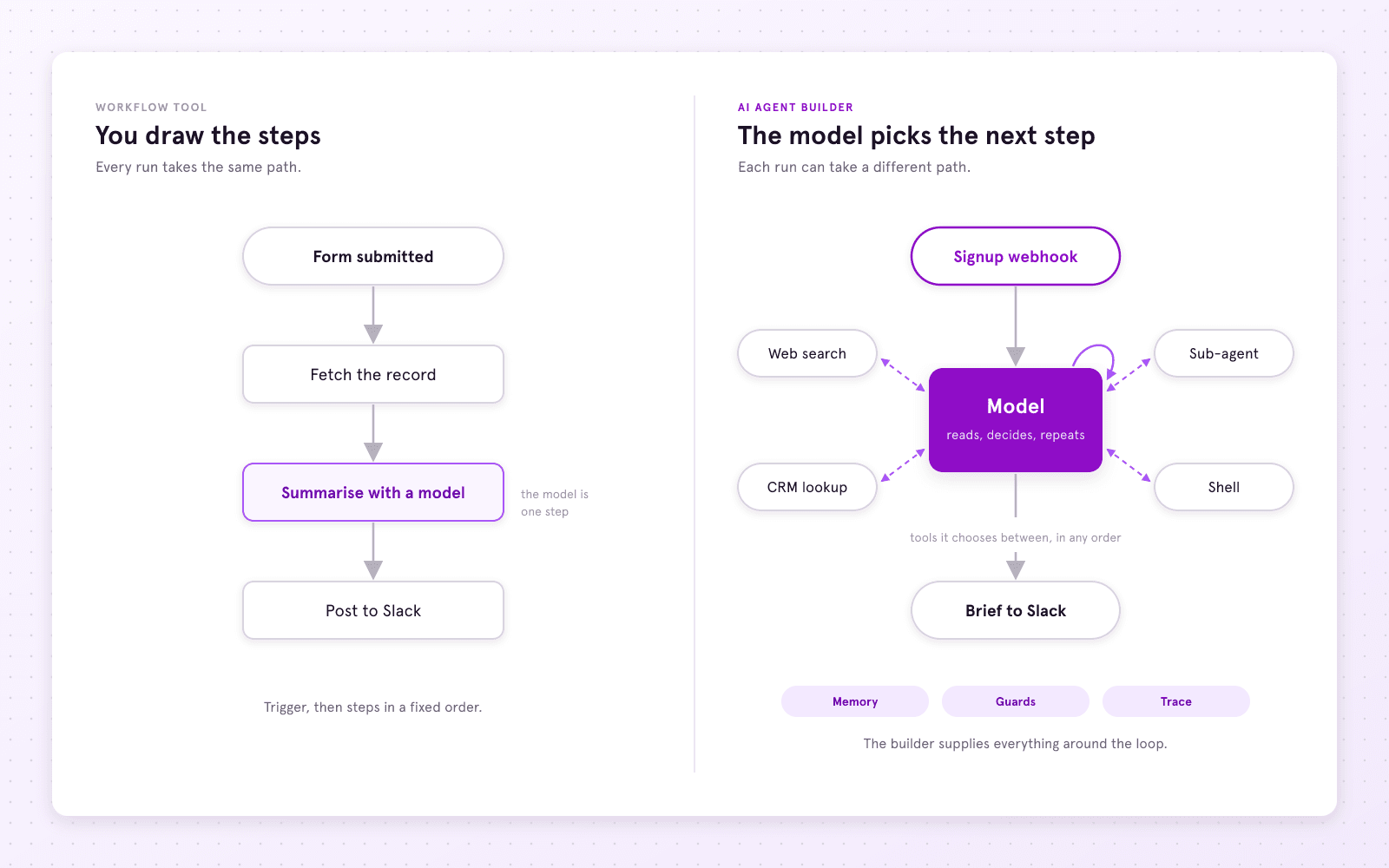
A workflow tool is built for a different shape. You draw the steps, and every run takes the same path. When a model goes in, it goes in as one step: the step before builds a prompt, the step after reads the reply. For many jobs that is fine. A form comes in, a model summarises it, the summary goes to Slack.
The jobs that broke this shape for me were the ones where the model has to look things up before it knows what to do. Inbound research is one. Sometimes the company site is enough. Sometimes the agent has to search for the person, check whether we have talked before, and then decide lead or not. That is not a line. It is a loop with four or five tools the model picks between.
An agent needs four things a workflow does not:
- Tools the model chooses between, in whatever order the run needs.
- Memory and threads. My Telegram bot is a thread per chat. In a workflow tool that is a storage step you wire.
- Guards on tools that do not depend on the model deciding well. Which repositories a tool may write to. Whether it may email at all.
- A trace of the path: which model call made which decision, which tool was called with what, where the time and tokens went.
Workflow tools have added agent nodes to cover this. They work, and I cover them fairly. The question is whether the agent is what the tool is built around, or a node inside something else.
5 best AI agent builders in 2026
- ServFlow, an agent runtime
- n8n, a workflow tool with an AI Agent node
- Zapier, a workflow tool with AI steps and Zapier Agents
- Make, a workflow tool with AI agents
- CrewAI, a multi-agent framework in Python
1. ServFlow
Best for: Developers and small teams who want an agent as a deployable thing, with tools, memory and traces built in.
What I like: The agent is the unit. Any action, MCP server, shell command or sub-agent is a tool. Every run is a trace. Canvas and YAML are the same agent.
Pricing: Free plan with three agents. Paid from $20 a month.
Kind: Agent runtime.
ServFlow is an agent builder and runtime. You design an agent on a canvas or in YAML, and a small Go engine runs it. It is the one I use most, and the youngest product here, and I say where that shows.
How ServFlow works
An agent has four parts:
- Entry. HTTP, cron, a webhook, or a chat platform: Telegram, Discord, Slack, GitHub.
- Context steps. Fetch what the model needs before it runs.
- Agent nodes. Each with a provider, a prompt and tools.
- Response. What goes back.
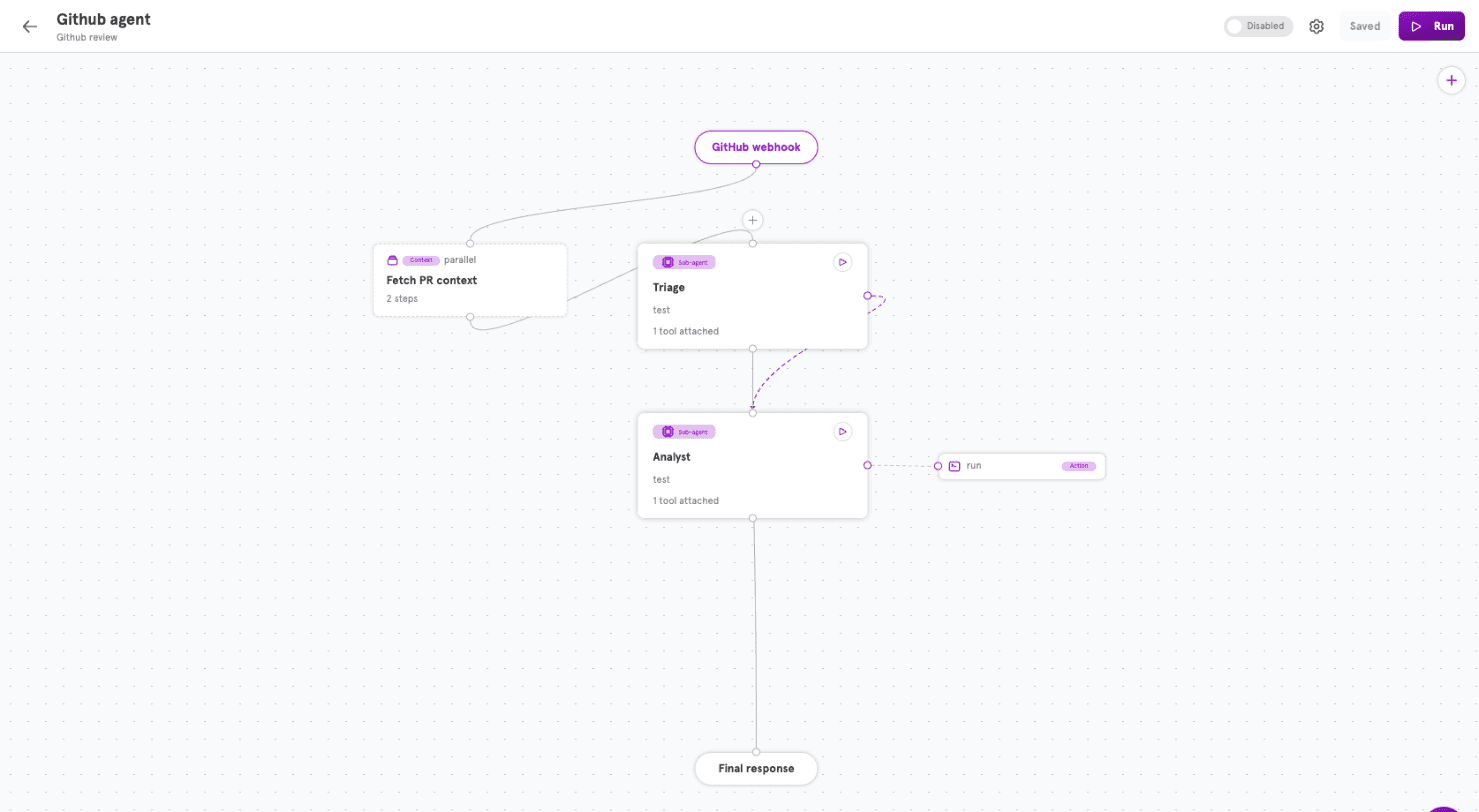
Every agent is also a YAML file, so it lives in git and deploys from the CLI. ServFlow exposes a management MCP server, so a coding agent such as Claude Code can build and deploy one for you. Most of mine now start as a sentence in Claude Code.
Here is the same agent as YAML, trimmed to its shape:
name: Github agent
entries:
  - type: handler
    handlerConfig:
      type: github_webhook
      path: /webhooks/github-code
      config:
        events: [issue_comment, pull_request]
        trigger_text: "@servflow"
    start: context.fetch
contextGroups:
  fetch:
    name: Fetch PR context
    isParallel: true
    steps:
      - { id: meta, type: github_fetch, config: { resource: pr_meta } }
      - { id: conversation, type: github_fetch, config: { resource: pr_conversation } }
    next: agent.triage
agents:
  triage:
    name: Triage
    systemPrompt: You are the pull request assistant for this repository...
    tools:
      - type: agent
        name: analyze_code
        agentConfig: { id: analyst }
  analyst:
    name: Analyst
    systemPrompt: You do code work in a sandboxed shell... You only read.
    tools:
      - type: action
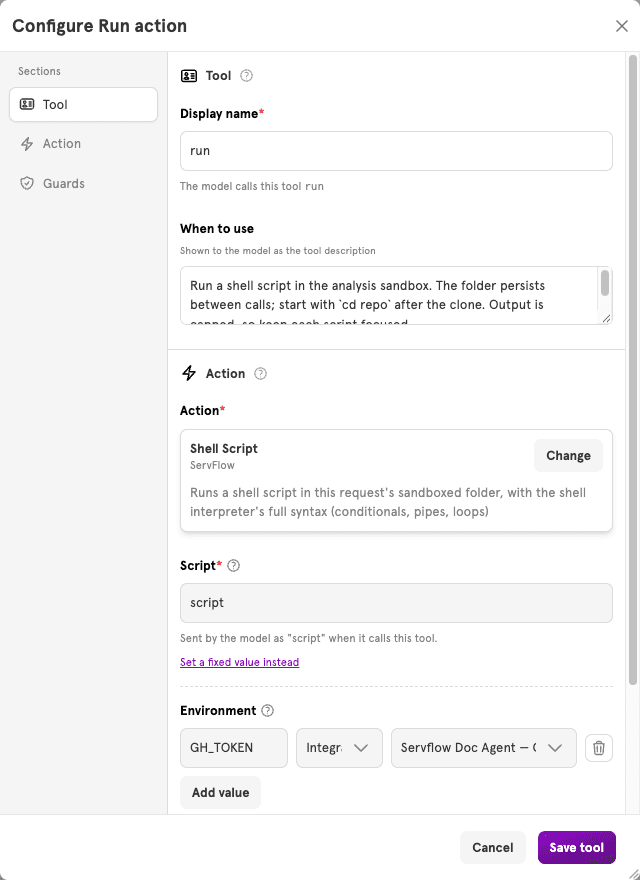
        name: run
        actionConfig:
          type: shell
          config:
            env: [{ name: GH_TOKEN, integrationId: github }]
What I run on it
- Inbound research. A signup webhook starts it. The agent reads the company site, searches for the person if the site is thin, checks whether we have talked before, and posts a brief to Slack with a lead-or-not verdict.
- Lead search. A cron entry each morning. It takes my description of a good customer, searches for matches, enriches each one, and appends rows to a sheet with a one-line reason.
- PR review. A GitHub entry on every pull request or
@servflowmention. A triage agent decides what is needed and hands code work to an analyst agent, which clones the repository in a sandboxed shell and reads the change. The triage agent's answer is posted as the PR comment. - Assistants. A Telegram bot and a Slack bot that look things up in Notion and remember the thread.
Tools, memory and traces
- Tools. Any integration action, any MCP server, a shell command in a sandbox, or another agent. Each carries guards the model cannot talk its way past.
- Memory. A workspace is a filesystem the agent keeps across runs; lead search stores what it has already seen there. A conversation is a thread the agent owns, so a chat bot needs no storage step.
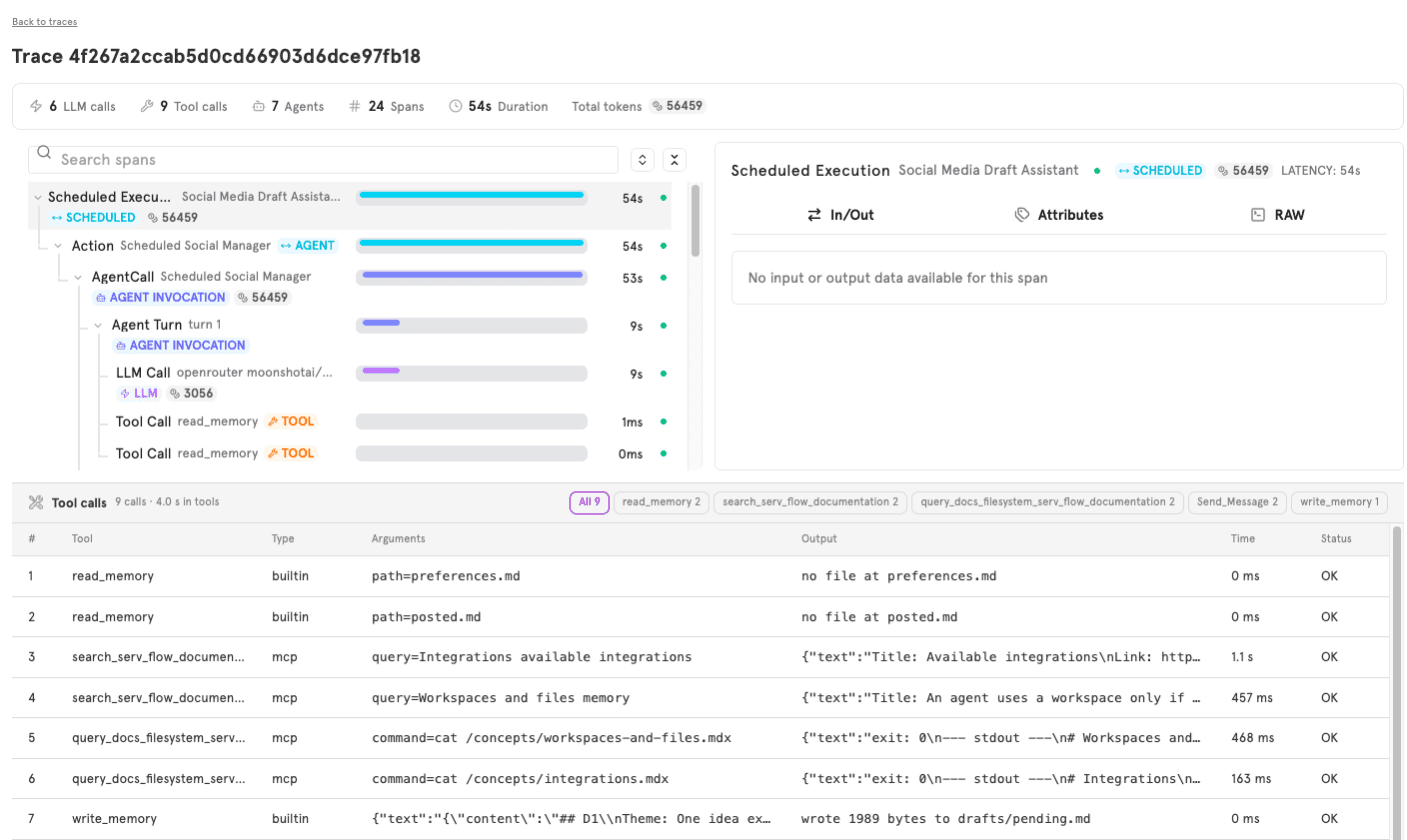
- Traces. Every run is an OpenTelemetry trace:
invoke_agentfor the run,chatper model call with tokens,execute_toolper tool call. When the inbound agent calls someone a lead who is not, the trace shows which search result it believed. More in An agent's answer is not the whole story.
Where ServFlow fits
- Fits: research that branches on what it finds, a support bot that answers or escalates, a reviewer that runs tests, an assistant that remembers the thread.
- Does not fit: automations with no model in them. A payment that adds a row and posts to Slack is a workflow, and I keep mine in a workflow tool.
- Both: the workflow does the plumbing and calls the agent's HTTP entry for the step that needs judgement.
ServFlow pricing
- Free: $0. 3 enabled agents, 3 concurrent runs, 10 runs a minute. No trace viewer.
- Starter: $20 a month. 20 agents, 20 concurrent runs, 250 runs a minute, trace viewer.
- Pro: $50 a month. Unlimited agents, 50 concurrent runs, 500 runs a minute, trace viewer.
You bring your own model key. No per-task or per-credit charge.
ServFlow pros and cons
Pros
- The agent is the unit: entries, tools, memory and traces come with it.
- Any action, MCP server, shell command or sub-agent is a tool, with guards.
- Conversations and workspaces are built in, so bots need no storage step.
- Every run is an OpenTelemetry trace.
- Canvas and YAML are the same agent, so agents live in git.
Cons
- Far fewer connectors than Zapier, Make or n8n.
- A young product: small template library, small community, rough edges.
- Not the tool for automations with no model in them.
Overall: what I use when the agent is the product.
2. n8n
Best for: Technical teams who self-host workflows and are adding agents to them.
What I like: A clear node canvas, real self-hosting, and an AI Agent node that is a true agent loop.
Pricing: Self-hosted Community Edition is free. Hosted from €20 a month, billed annually.
Kind: Workflow tool with an AI Agent node.
n8n was my second home after Zapier, and it is where I send most developers who want to add a first agent to workflows they already run. The self-hosted edition is under a fair-code licence.
How n8n works
- Drag nodes onto a canvas and connect them. A trigger starts the run.
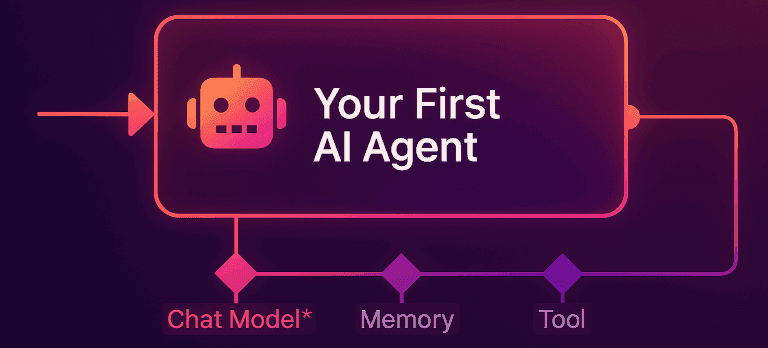
- The AI Agent node has three attachment points: a chat model, a memory, and tools. Each tool is a node, often another workflow, and the model picks between them.
- Models need your API key, or n8n's bundled access on hosted plans.
- Executions count per run, not per step, so a looping agent does not run up the bill.
Where n8n fits
- Fits: you already have workflows, want to own the infrastructure, and an agent is one thing among many.
- Strains: when the agent is the whole product. My first inbound research agent was an n8n Agent node with three tool workflows. It worked. What wore me down was everything around it: a thread per person meant a database step, "never email anyone" meant a check I wrote, and the execution log showed the node's input and output but not the six model calls inside it.
n8n pricing
Billed annually. Check n8n's pricing page.
- Community Edition: free, self-hosted.
- Starter: €20 a month. 2,500 executions, 5 concurrent, agents and AI nodes.
- Pro: €50 a month. 10,000 executions, up to 50 concurrent, workflow history.
- Business: €667 a month. 40,000 executions, self-hosted, SSO, Git version control.
- Enterprise: contact sales.
n8n pros and cons
Pros
- Real, well-documented self-hosting, and a free edition.
- The AI Agent node is a true agent loop.
- A huge template library, community and integration set.
- Per-run pricing suits agents that loop.
Cons
- The agent is a node inside a workflow. Threads, guards and agent-level traces are yours to build.
- A real learning curve: expressions, node settings, data shapes.
- Business is a large jump from Pro.
Overall: the strongest workflow tool here for technical teams.
3. Zapier
Best for: Business teams who want AI inside automations across the widest set of apps.
What I like: An integration catalog with no equal, stable Zaps, and Agents on the free plan to try.
Pricing: Free plan. Paid from $19.99 a month billed annually. Agents billed separately in activities.
Kind: Workflow tool with AI steps and Zapier Agents.
Zapier was the first automation tool I used, and I still have Zaps. A Zap is a trigger and a sequence of actions across more than 8,000 apps. In the last two years Zapier added AI steps inside Zaps, a Copilot that builds Zaps, and Zapier Agents, a separate product.
How Zapier works
- A Zap starts with a trigger in one app and runs actions in others.
- AI by Zapier is a step inside a Zap: a prompt built from earlier steps, returning text or fields for later ones.
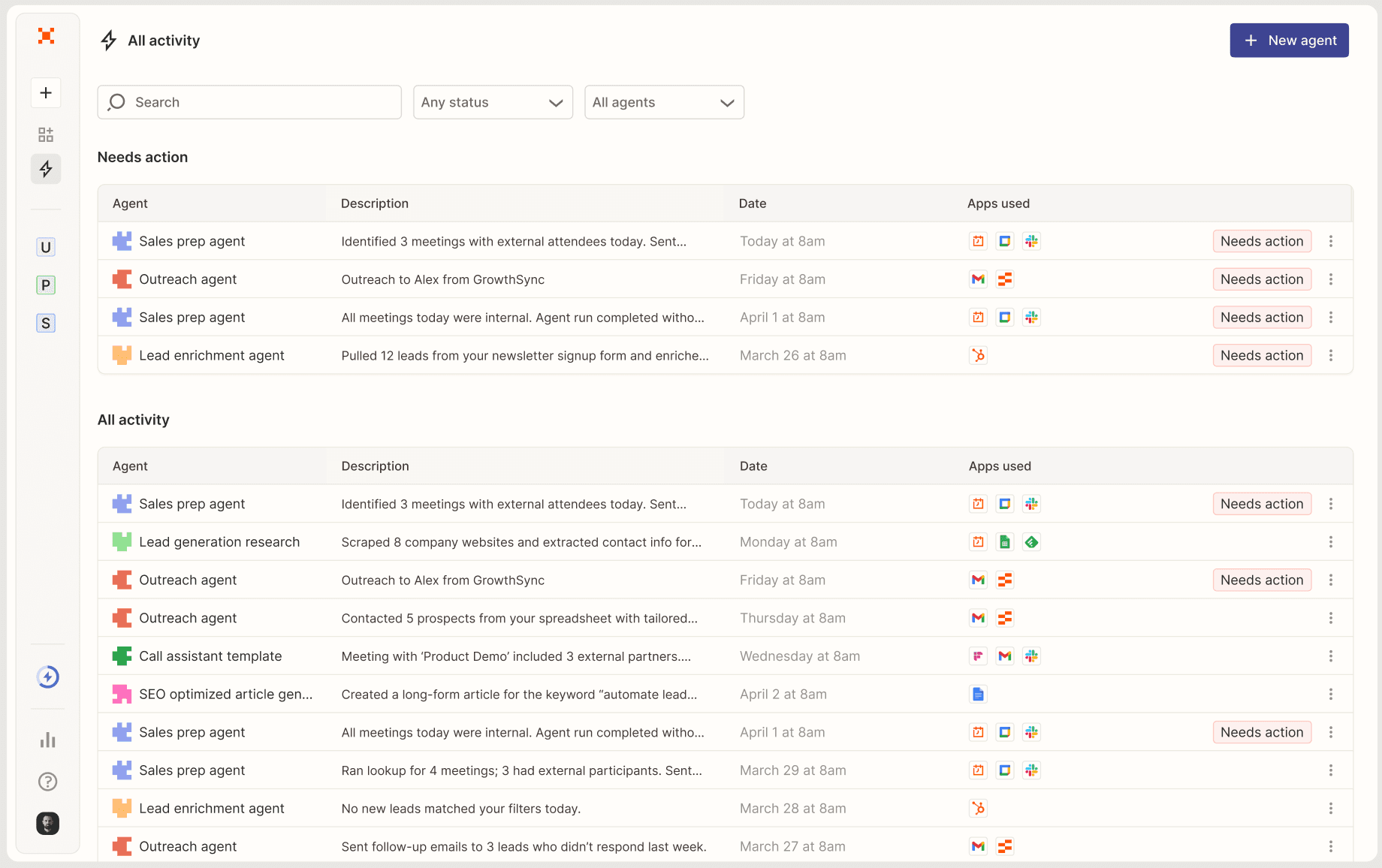
- Zapier Agents is the other route: instructions, data sources, allowed actions, and the agent decides when triggered.
- Zaps bill in tasks. Agents bill in activities, from a separate pool.
Where Zapier fits
- Fits: when the apps matter most. CRM, billing, forms and a spreadsheet in one Zap, with no infrastructure. My Stripe-to-CRM-to-Slack Zap has not changed in two years.
- Strains: control and visibility. When I tried Agents for lead search, tools were Zapier actions with Zapier's limits, there were no guards of my own, and a run showed activities, not decisions. That Zap now calls my ServFlow agent over HTTP for that step.
Zapier pricing
Annual prices, smallest task tier. Check Zapier's pricing page.
- Free: $0. 100 tasks, two-step Zaps, 400 Agent activities.
- Professional: from $19.99 a month. 750 tasks, multi-step Zaps, AI by Zapier, 1,500 Agent activities.
- Team: from $69 a month. 2,000 tasks, 25 seats, SAML SSO.
- Enterprise: contact sales.
- Agents add-on: from about $33 a month on annual Pro.
Zapier pros and cons
Pros
- The largest integration catalog, with triggers for most of it.
- Stable, documented, familiar to business teams.
- AI steps and Agents on the free plan.
Cons
- Agents are a separate product with separate billing, layered on a workflow tool.
- No per-tool guards of your own, no trace of decisions.
- Task pricing adds up on long processes.
Overall: the pick when the automation is mostly about the apps.
4. Make
Best for: Teams who want visual workflows with many connectors at a lower price than Zapier.
What I like: The clearest data-flow canvas, cheaper credits for long scenarios, AI agents and an MCP server built in.
Pricing: Free plan with 1,000 credits a month. Paid plans by credit volume.
Kind: Workflow tool with AI agents.
Make (formerly Integromat) sits between Zapier and n8n: more visual control than Zapier, hosted only unlike n8n, usually cheaper than Zapier at the same volume. I have used it least, mostly to rebuild a long Zap that was getting expensive.
How Make works
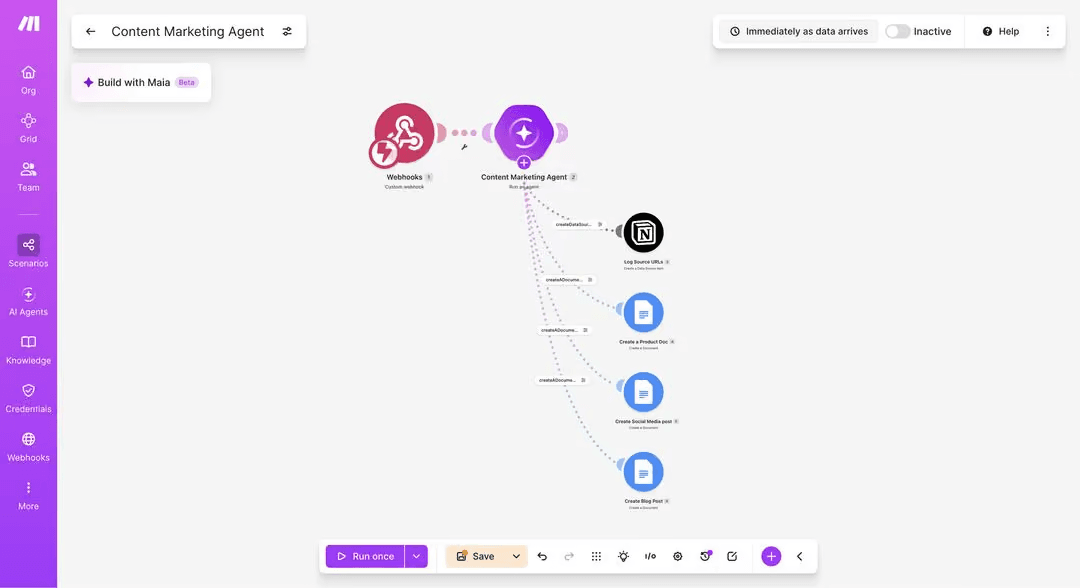
- A scenario is a chain of modules with routers, iterators and error handlers drawn in.
- AI agents take instructions and use your scenarios as tools.
- An MCP server lets an outside agent call your scenarios.
- Billing is in credits. Most actions cost one; some AI actions cost more.
Where Make fits
- Fits: the same jobs as Zapier at a lower price, for teams who like to see the data flow.
- Strains: the same place as n8n and Zapier. The agent is a layer over scenarios, with no threads, guards or agent-level trace.
Make pricing
Check Make's pricing page.
- Free: $0. 1,000 credits, 1 data store.
- Core, Pro, Teams: by credit volume, with auto-purchase of extra credits.
- Enterprise: contact sales.
Make pros and cons
Pros
- The clearest visual mapper, with routing and error handling on the canvas.
- Cheaper than Zapier for long scenarios.
- AI agents and MCP are part of the product, not an add-on.
Cons
- Hosted only.
- The agent is a layer over scenarios.
- Credit pricing is hard to predict, and AI actions cost more than one.
Overall: the workflow tool to pick when price and visual control matter.
5. CrewAI
Best for: Python developers building multi-agent systems in code.
What I like: Crews with roles and tasks are a clear model. Open source, with a hosted platform for tracing and deployment.
Pricing: Free framework. Hosted Basic plan free with 50 executions a month. Enterprise custom.
Kind: Multi-agent framework in Python.
CrewAI is a Python framework for teams of agents, called crews. Before ServFlow had sub-agents, I prototyped lead search as a two-agent crew, and it is still the clearest way I know to explain multi-agent systems.
from crewai import Agent, Task, Crew

researcher = Agent(
    role="Researcher",
    goal="Find companies that look like our best customers",
    tools=[web_search],
)
writer = Agent(role="Writer", goal="Write one line on why each company fits")

crew = Crew(
    agents=[researcher, writer],
    tasks=[
        Task(description="Find ten matching companies", agent=researcher),
        Task(description="Write the fit note for each", agent=writer),
    ],
)
crew.kickoff()
How CrewAI works
- Each agent has a role, a goal and tools. Tasks are assigned to agents. A process decides the order.
- Tools are Python functions or built-ins.
- The hosted platform adds a visual editor, deployment, OpenTelemetry tracing, guardrails and human-in-the-loop input.
Where CrewAI fits
- Fits: the agent logic is the interesting part and you want it in Python.
- Strains: entries, integrations and chat threads are things you build. I moved the crew to ServFlow because I did not want to own a Python service for it. ServFlow sits between CrewAI and the workflow tools: agents are config, not code, but you do not write or host the loop.
CrewAI pricing
Check CrewAI's pricing page.
- Framework: free and open source.
- Basic: free. Visual editor, 50 executions a month, tracing, guardrails, cron.
- Enterprise: custom. SSO, RBAC, PII redaction, your own VPC, dedicated support.
CrewAI pros and cons
Pros
- Open source and in Python, so the logic is fully yours.
- A clear, well-documented model.
- The platform adds tracing and deployment without changing your code.
Cons
- You write and maintain code, and own the runtime unless you pay.
- Entries, integrations and threads are yours to wire.
- Enterprise pricing is not public.
Overall: the pick when the agent is a program you want to write.
AI agent builders compared
| Tool | Kind | Best for | Self-host | Agent memory | Run trace | From |
|---|---|---|---|---|---|---|
| ServFlow | Agent runtime | Agents that decide | No | Workspaces, conversations | OpenTelemetry trace | Free; $20 |
| n8n | Workflow tool | Self-hosted workflows adding agents | Yes | Memory node | Log per node | Free; €20 |
| Zapier | Workflow tool | The most apps | No | Agent data sources | Activity history | Free; $19.99 |
| Make | Workflow tool | Visual workflows, lower cost | No | Data stores | Scenario log | Free; credits |
| CrewAI | Code framework | Multi-agent in Python | Yes | In code | OpenTelemetry on platform | Free |
Which AI agent builder is the best?
One question decides it: does the model pick the next step, or do you?
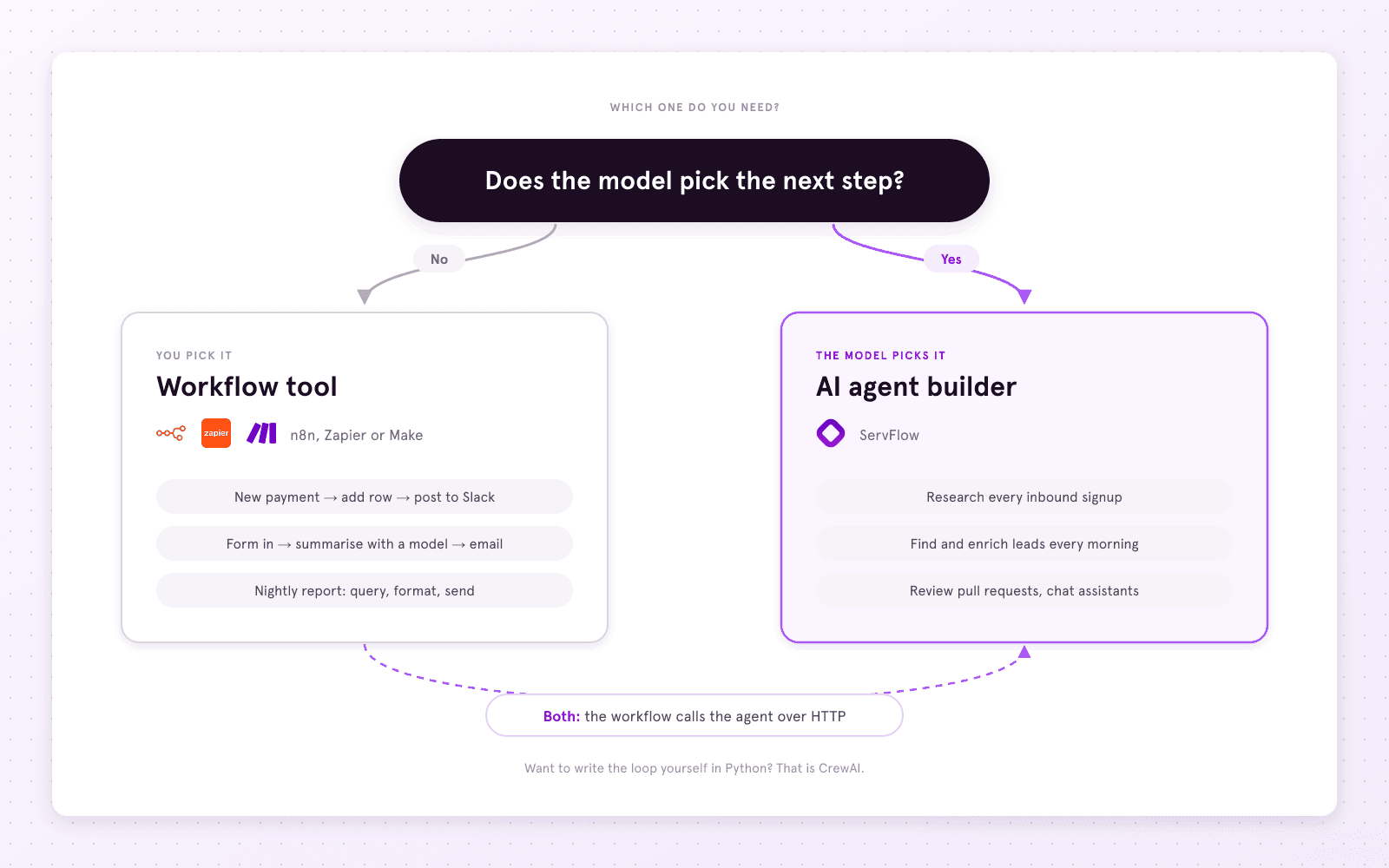
The same answer by job, using the ones I run:
| You want to... | Use | Why |
|---|---|---|
| Move a new Stripe customer into the CRM and post to Slack | n8n, Zapier or Make | No model, no decisions. Mine is a Zap. |
| Summarise a form submission with a model and send it on | n8n, Zapier or Make | One model call in a fixed place. |
| Run a nightly report: query, format, send | n8n, Zapier or Make | Scheduled and deterministic. |
| Research every inbound signup and say whether it is a lead | ServFlow | The path branches on what it finds, and I need the trace when it is wrong. |
| Find and enrich leads that match a description, every morning | ServFlow | A cron entry, a workspace for what it has seen, tools it picks between. |
| Review pull requests: read the diff, run the tests, comment | ServFlow | Tools at run time, two agents, and a sandboxed shell to read the code. |
| Give your team a Slack assistant that remembers past threads | ServFlow | Conversations are part of the agent. |
| Write the agent loop yourself in Python | CrewAI | The logic is the product. |
| Let a Zap or scenario call an agent for one step | Both | The workflow does the plumbing and calls the agent's HTTP entry. |
In short:
- No model in the automation: n8n, Zapier or Make. n8n to self-host, Zapier for the apps, Make for the price. I make an agent builder and I do not use it for these.
- One model step in a fixed place: stay in your workflow tool.
- The model decides: ServFlow. Tools, guards, threads and traces, in git.
- You want to write the loop: CrewAI.
- Both: keep the workflow and give the agent the one step that needs judgement, over HTTP. That is how most of my setup looks.