 Servflow
 Kofo Okesola
I set up a Make scenario that watched a form, looked each submission up in a sheet, and posted to Slack. It worked for a week. Then a webhook fired on a batch import, the iterator ran every module once per row, and 10,000 credits were gone before lunch.
You picked Make because it was the sensible price. Ten dollars for ten thousand operations, when Zapier wanted thirty for 750 tasks. The price is real. What is not visible is what one run will cost until it has run, and that is the whole problem.
What I noticed
- A loop is a multiplier. An operation is one module run on one bundle. An iterator over 50 records runs every module after it 50 times. Make's own help page says so; the scenario editor does not.
- Errors are not on the free list. Make's pricing page names what does not use credits: error handler modules and the router. A module that ran and failed is not on that list. The handler is free; what reached it was not.
- There is no number for a run. The execution log shows modules and bundles. It does not show what one run cost, so the monthly figure is a surprise.
Who should stay with Make
Stay if your scenarios move data and do not think, and run under 10,000 operations a month. At about $9 to $10.59 a month, Make is the cheapest tool for that work, and the canvas is worth learning once. Stay if you have scenarios with careful error handling already built and running clean.
Move if you have had the day the credits vanished, or if your scenarios have AI modules in them and you cannot predict what they cost.
Three alternatives
Servflow is ours and comes first. The other two are honest picks for different teams.
Servflow, if you want to see what each run did and what it cost. Servflow is AI automation that runs on your schedule, inbox, Slack or GitHub. Each automation runs as one agent, from $10 a month with AI at cost. Every run is a trace: the trigger, what each step did, the answer, and the run's cost in credits, on one page. Credits stop at zero; nothing is billed past your plan unless you top up. The trade-off is scope. Servflow is built for jobs with a judgement in them, inbox triage, follow-ups, reports, and connects to 17 apps through its integrations catalog plus GitHub, Telegram, Discord, HTTP, cron and MongoDB. For bulk data syncing between two apps it is not the tool.
Zapier, if you want it easier and will pay for it. Zapier is the simplest canvas there is, and failed steps are not billed. The trade-off is the price: $29.99 a month for 750 tasks, and AI steps cost one, three or five tasks each. We cover that in Zapier alternatives.
n8n, if someone technical will own it. n8n charges per execution, however many steps, so a loop inside one run costs one execution instead of a credit per record. Cloud Starter is about €20 a month billed annually for 2,500 executions; the Community Edition is free to self-host. The trade-off is that it is a developer's tool, and a loop that re-triggers the workflow still burns the month; Starter and Pro are capped with no overage. We cover that in n8n alternatives.
Side by side
Monthly billing where it exists.
| Servflow | Make | Zapier | n8n | |
|---|---|---|---|---|
| Entry paid plan | $10 a month, 10,000 credits | $10.59 a month, 10,000 credits ($9 billed annually) | $29.99 a month, 750 tasks | €20 a month billed annually, 2,500 executions |
| Unit | A run is 4 credits plus the AI at cost | A credit per module operation | A task per successful step | An execution per run |
| A loop over 50 records | One run | 50 operations per module after the iterator | Up to 50 tasks per action | One execution |
| Failed runs | Counted at the run fee | Not listed as free | Not counted | Counted |
| Over the limit | Stops at zero; top up $1 per 1,000 | Scenarios stop; extra credits in bundles of 1,000 or 10,000 at the plan rate | Stops, or a higher task rate to a 3x cap | Capped, no overage |
| Cost of one run visible | On the trace, every run | Not as a number | Not as a number | Not as a number |
| Free plan | 4,000 credits once, no card | 1,000 credits a month | 100 tasks a month | Self-hosted only |
What a run looks like on Servflow
This is the feature the Make day is missing. Every run on Servflow is a trace: a tree with the trigger at the top, each step under it with its timing, each model call with what it was asked and what it answered, and the run's cost in credits.
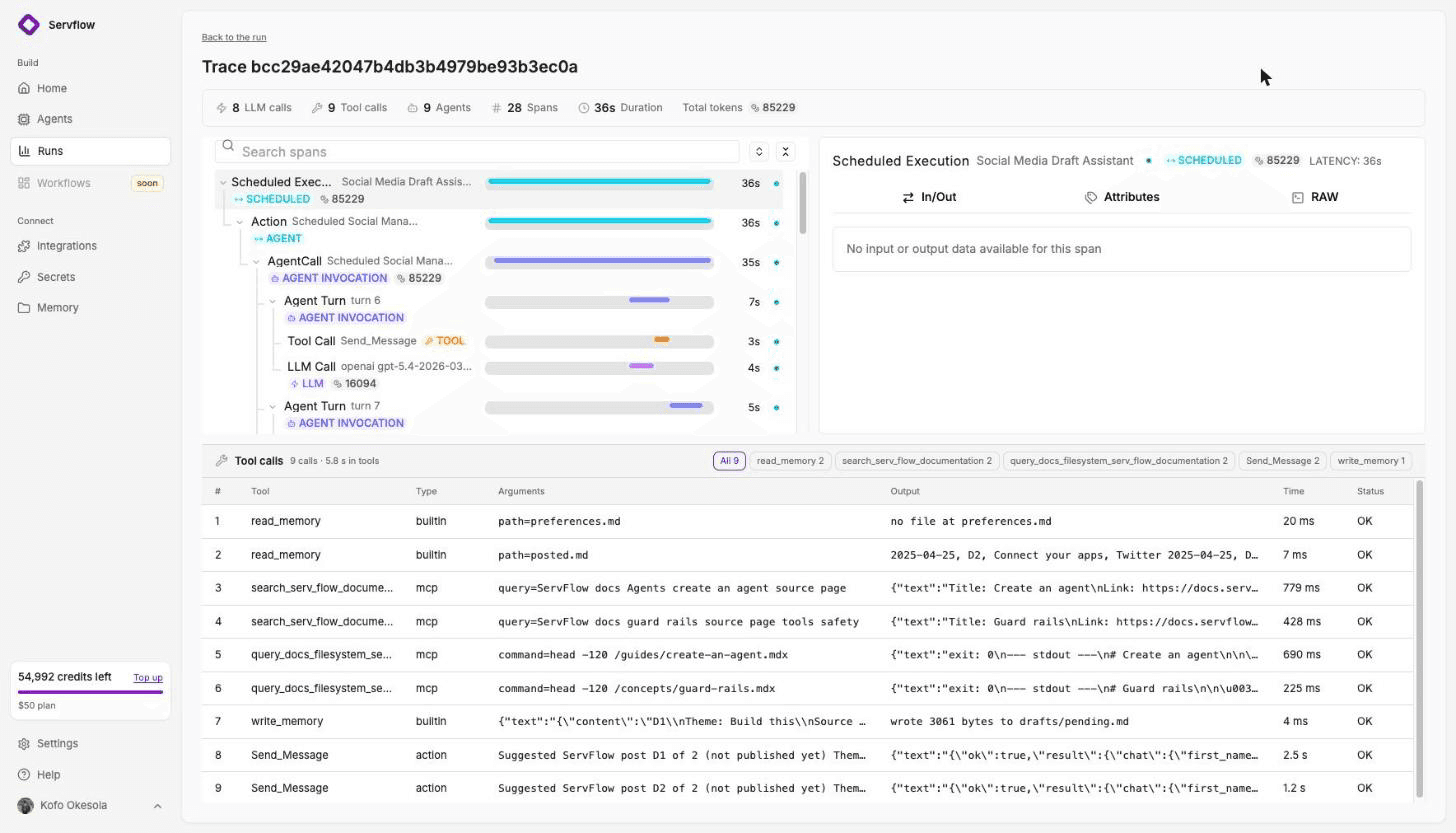
If a run costs more than the last one, the trace says which step did it. If the automation misfires, the runs list shows it the same hour, not at the end of the month. And the cap is a sentence, not a hope: credits stop at zero, and nothing is billed past your plan unless you top it up.
Moving a scenario
Make exports a scenario as a blueprint JSON. Nothing else imports it, but it is a complete spec.
- Move the scenario that spent the most. It is the one that pays for the change.
- Start from a template. Open Templates on Servflow and pick the job. Gmail Triage, Meeting Prep, LinkedIn Posts from Notion. The trigger and actions are wired.
- Add the same integrations once. Gmail, Slack, Notion, HubSpot and the rest are shared across every automation on your team.
- Paste the instructions. What your AI module or your filter logic was meant to do goes into the sub agent's instructions in plain words.
- Test, read the trace, enable. Check the credit cost of the test run. Enable sets the schedule and your monthly cap.
FAQ
What is the best Make alternative for a small team? For automations with AI steps, Servflow from $10 a month with AI at cost and a trace of every run. For the same data-moving work with less to learn, Zapier Professional at $29.99 a month for 750 tasks. For technical teams, n8n Cloud Starter at about €20 a month billed annually, or self-hosted for free.
Why did my Make scenario use all its operations? Each module run on each bundle is an operation. An iterator over 50 records runs the next module 50 times. A trigger that misfires, or a scenario that calls itself, can spend a month's credits before you look. Only error handler modules and the router are listed as free.
Does Make charge for errors? Make's pricing page lists what does not count: error handler modules and the router. A module that ran and failed is not on that list, so plan for it to count. Make's help pages do not say either way.
Is Servflow cheaper than Make? For plain data moving, no: Make's Core plan at about $9 to $10.59 a month for 10,000 operations is hard to beat. For automations with AI steps, Servflow charges the model's price plus 4 credits a run and shows the cost on each run, so you know the bill before the month ends.
How do I move a Make scenario to Servflow? Make exports a scenario as a blueprint JSON, which no other tool imports. Use it as the spec: start from the closest Servflow template, add the same integrations, paste the instructions, run a test, read the trace, and enable it.
Start free
Start from a template, add your integrations, and enable it. 4,000 credits free, no card. From $10 a month, AI at cost.
Related: Zapier alternatives for small teams · n8n alternatives if you do not code · Relay.app has shut down · Gmail Triage template · What an AI automation costs per run · Pricing