 Servflow
 Kofo Okesola
"All accounts, workflows, and run history have been permanently deleted."
That is the whole of relay.app today, one sentence above a link to an archived copy of the old home page. If your lead follow-ups, your weekly reports or your approval queue ran there, they stopped on 14 September 2026, and whatever you did not export is gone.
I used Relay for a lead follow-up that drafted the email and waited for me to press send. It was the only tool I had tried where that step did not feel bolted on. That is the thing I went looking for when it closed.
Most people who picked Relay picked it for one thing: a step where a person looks before the automation acts. You could have an AI draft the email and still be the one who sent it. That is a rarer feature than it should be, and most of the tools people are moving to do not have it in the same shape. This page is about keeping it.
What happened to Relay
| Date | What Relay did | Source |
|---|---|---|
| 16 July 2026 | Emailed customers, disabled signups and upgrades, cancelled subscriptions with free access until the end | getinboxzero.com, usecarly.com, both 16 and 17 July 2026 |
| 15 August 2026 | Deleted free accounts and their data | TechCrunch, 17 August 2026 |
| 14 September 2026 | Deleted paid accounts and their data; the site became a notice | Relay's notice to customers, July 2026, as reported by getinboxzero.com; relay.app today says only that it shut down in September 2026 |
The notice said you could export workflows, sequences and MCP servers as JSON with their AI prompts, and run history and tables as CSV, "so you can rebuild them elsewhere". There was no importer anywhere, and there still is not. Relay named no alternative and gave no reason.
Who should pick what
Three tools cover what Relay did for a small team. Servflow is ours, and it is first because it is the one built around the step Relay users will miss. The other two are honest picks for different situations.
Pick Servflow if your automations had an AI step and a person at the end. Servflow is AI automation that runs on your schedule, inbox, Slack or GitHub. Each automation runs as one agent, from $10 a month with AI at cost. The approval step is not a feature you add, it is how you set it up: you give the automation a draft action and not a send action, and the last click stays with you.
Pick Zapier if the AI was a side dish and the app list is what you need. Zapier connects to more apps than anyone, and if your Relay workflows were mostly "when this happens in app A, do that in app B", Zapier rebuilds them fastest. The trade-off is the bill: 750 tasks for $29.99 a month, and AI steps cost one, three or five tasks each.
Pick n8n if someone on your team is technical and you would rather host it yourself. n8n's Community Edition is free to self-host for your own business use, and the canvas can express anything Relay could. The trade-off is that you become the integrator: credentials, updates and the server are yours to keep running.
Side by side
Monthly billing where it exists.
| Servflow | Zapier | n8n | |
|---|---|---|---|
| Entry price | $10 a month, 10,000 credits | $29.99 a month, 750 tasks (or $19.99 billed annually) | €20 a month billed annually, 2,500 executions; free self-hosted |
| What you pay for | 4 credits a run, plus the AI at what it costs | A task per successful step; AI steps 1x, 3x or 5x | An execution per run, however many steps |
| Person-in-the-loop step | Draft-only tools; you send | Approval step on paid plans | Wait node holding for a form |
| When you hit the limit | Credits stop at zero; top up $1 per 1,000 | Zaps stop, or pay-per-task at a higher rate to a 3x cap | Capped, no overage |
| Free plan | 4,000 credits once, no card | 100 tasks a month | Community Edition, self-hosted |
| Apps | 17 in the integrations catalog, plus GitHub, Telegram, Discord, HTTP, cron and MongoDB | Thousands | Hundreds, plus HTTP |
How the approval step runs on Servflow
Here is the shape of a Relay-style automation on Servflow, using the template we run ourselves.
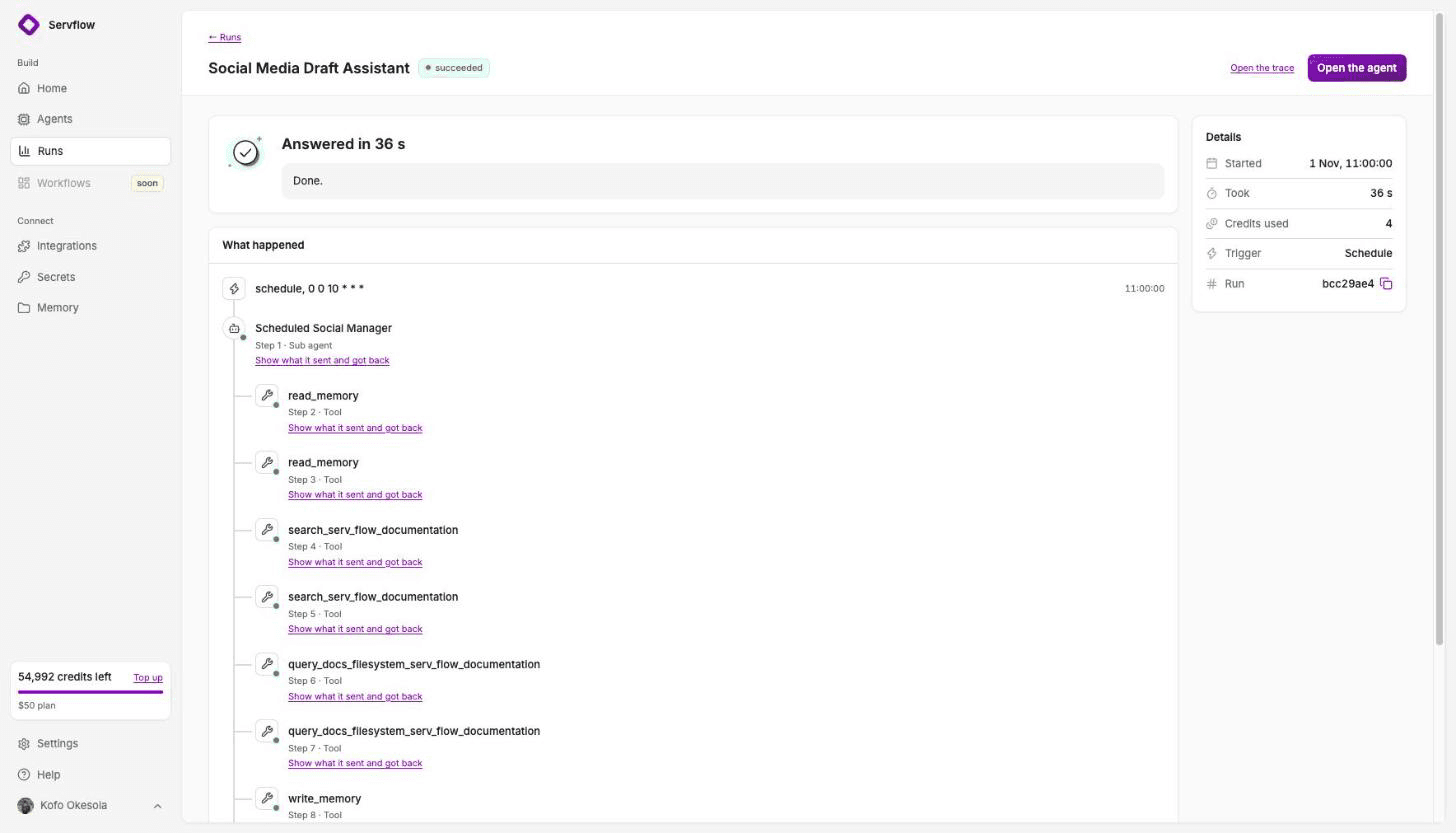
Every weekday morning an automation reads our database for people who signed up and stalled. It drafts one email per kind of stall in Zoho Mail, with everyone who needs that kind in BCC, and messages me on Discord with the counts. Then it stops. It has a draft action and no send action, so it cannot send. I read the drafts and press send, or do not.
The same shape covers the usual Relay jobs:
- Email triage. The Gmail Triage template reads new mail, saves a reply as a draft and messages you on Discord when one is urgent. It never sends.
- Lead follow-up. The Outreach Drafts template reads a database, writes one draft per kind of lead, and remembers who it wrote to so nobody gets a second nudge.
- Weekly reports. A schedule trigger, a step that gathers the numbers, and a message to Slack. No approval needed, so none is built in.
Each run is a trace you can open: the trigger, what each step did, the answer, and what it cost in credits. If a draft looks wrong, the trace shows which step produced it.
Moving from Relay
If you exported before 14 September, you have JSON files with your prompts in them. Nothing imports them, but they are a good spec.
- Start with the automation that has a deadline. A follow-up that is now 7 weeks late matters more than a report nobody asked about.
- Rebuild from a template, not from the JSON. On Servflow, open Templates, pick the closest job, and paste your Relay prompt into the sub agent's instructions. The trigger and the draft action are already wired.
- Keep the person at the end. Check the tools attached to the automation. If there is a send action and you want approval, remove it and keep the draft one.
- Run a test and read the trace. The test streams, and the trace shows every step. Enable it when the draft looks right.
- Set the schedule and the cap. On Enable, set when it runs and your monthly credit limit. Credits stop at zero; nothing is billed past your plan unless you top up.
FAQ
Is Relay.app still working? No. Relay.app disabled signups on 16 July 2026, deleted free accounts on 15 August and paid accounts on 14 September 2026. The site now shows a shutdown notice and a link to an archived copy of its old home page.
Can I import my Relay.app workflows somewhere else? No tool imports a Relay export. Relay let you download workflows as JSON and run history as CSV so you could rebuild by hand. If you did not export before 14 September, the data is gone.
What is the closest alternative to Relay.app's human-in-the-loop steps? Servflow is the closest for small teams: give the automation a draft action and not a send action, and the person does the last step. Zapier has an approval step in its paid plans. n8n has a Wait node that can hold for a form response.
How much will the move cost per month? For one or two automations: Servflow from $10 a month with AI at cost, Zapier Professional $29.99 a month for 750 tasks, n8n Cloud Starter about €20 a month billed annually for 2,500 executions, or free if you self-host n8n.
Why did Relay.app shut down? Relay gave no reason in its notice. TechCrunch reported on 17 August 2026 that its founder, Jacob Bank, had rejoined Google as a vice president of product, and that staff followed. It was not an acquisition.
Start free
Start from a template, add your integrations, and enable it. 4,000 credits free, no card. From $10 a month, AI at cost.
Related: Zapier alternatives for small teams · n8n alternatives if you do not code · Outreach Drafts from MongoDB template · What an AI automation costs per run · Pricing