 Servflow
 Kofo Okesola
I got an n8n workflow running on a Saturday: a Gmail trigger, an AI node, a Notion write. It took the afternoon, most of it in Google Cloud setting up OAuth scopes so the Gmail node would connect. On Monday a teammate asked me to change the prompt, and I realised I was the only person who could.
n8n did not mislead anyone. It is the most capable automation canvas you can run yourself, and it is honest about who it is for: the home page counts developers. If your team has one, this page is not for you, and the section below says so. If your team does not, you are probably the person who got the workflow working on a Saturday and now owns it, and you are wondering whether there is a tool that does not need you to be that person.
What I noticed
- It assumes a developer. Expressions in curly braces, credentials you create in the app's own developer console, JSON in and JSON out. The OAuth afternoon is the normal experience, not the exception.
- A loop can spend the month. I built a retry that rescheduled itself every minute after a failure. It ran all night. n8n Cloud's Starter and Pro plans are capped with no overage, so once the executions are spent nothing more runs that month.
- The server is yours. Self-hosting is free, and it means updates, backups, a database and a domain are your job. Cloud removes that, at €20 a month billed annually for 2,500 executions.
Who should stay with n8n
Stay if someone on your team is technical and happy to own it. Nothing else is as flexible for the price, the Community Edition is free for your own business use, and the thousands of community templates cover most jobs. Stay if your workflows are data pipelines with code nodes and custom HTTP calls; no tool on this page does that better.
Move if the person who understands the workflows is also the person who should be doing something else.
Three alternatives
Servflow is ours and comes first. The other two are honest picks for different teams.
Servflow, if nobody on your team codes. Servflow is AI automation that runs on your schedule, inbox, Slack or GitHub. Each automation runs as one agent, from $10 a month with AI at cost. There is no canvas to wire: you start from a template for the job, or describe the automation in a sentence and Servflow drafts it. You add your integrations, run a test, read what it did, and enable it. The trade-off is range. Servflow is for jobs with a judgement in them, inbox triage, follow-ups, reports, team Q&A, and connects to 17 apps through its integrations catalog plus GitHub, Telegram, Discord, HTTP, cron and MongoDB. It is not a general data pipeline tool.
Activepieces, for an open-source canvas that is gentler. Activepieces is open source like n8n and can be self-hosted, but the canvas is simpler and a run is one credit however many steps. Plus is $20 a month for 10,000 credits, and AI steps cost 2, 10 or 20 credits by model. The trade-off is a smaller integration list and fewer templates than n8n.
Zapier, if you want the easiest path and will pay for it. Zapier is the simplest canvas there is, with the widest app list. The trade-off is the bill: $29.99 a month for 750 tasks, and AI steps cost one, three or five tasks each. We cover that in Zapier alternatives.
Side by side
Monthly billing where it exists.
| Servflow | n8n | Activepieces | Zapier | |
|---|---|---|---|---|
| Entry paid plan | $10 a month, 10,000 credits | €20 a month billed annually ($24 monthly), 2,500 executions | $20 a month, 10,000 credits | $29.99 a month, 750 tasks |
| Free | 4,000 credits once, no card | Self-hosted Community Edition | 1,000 credits a month, or self-hosted | 100 tasks a month |
| Unit | A run is 4 credits plus the AI at cost | An execution per run | A credit per run | A task per successful step |
| Who sets it up | Start from a template or describe it | A developer, on a canvas | Anyone, on a simpler canvas | Anyone, on the simplest canvas |
| Credentials | Connect the app once; shared by every automation | You create them, often in the app's developer console | Connect the app | Connect the app |
| Over the limit | Stops at zero; top up $1 per 1,000 | Capped, no overage | $0.007 a credit | Stops, or a higher task rate to a 3x cap |
| Hosting | SaaS or self-hosted, same product | Self-hosted or Cloud | Self-hosted or Cloud | SaaS |
How it starts on Servflow
The feature n8n does not have is the start. On Servflow the first screen after signup asks what you want automated, then shows the templates for that job.
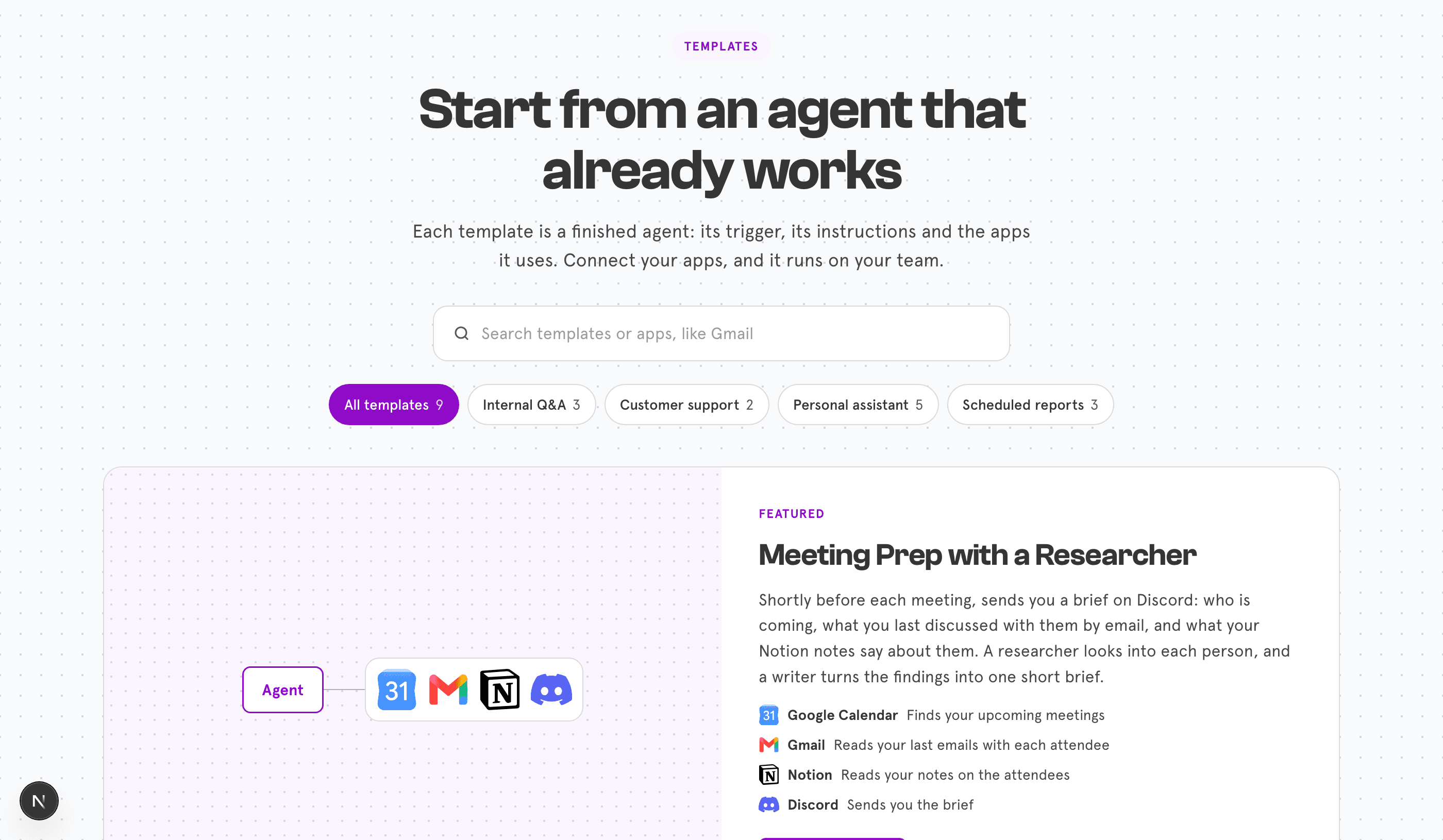
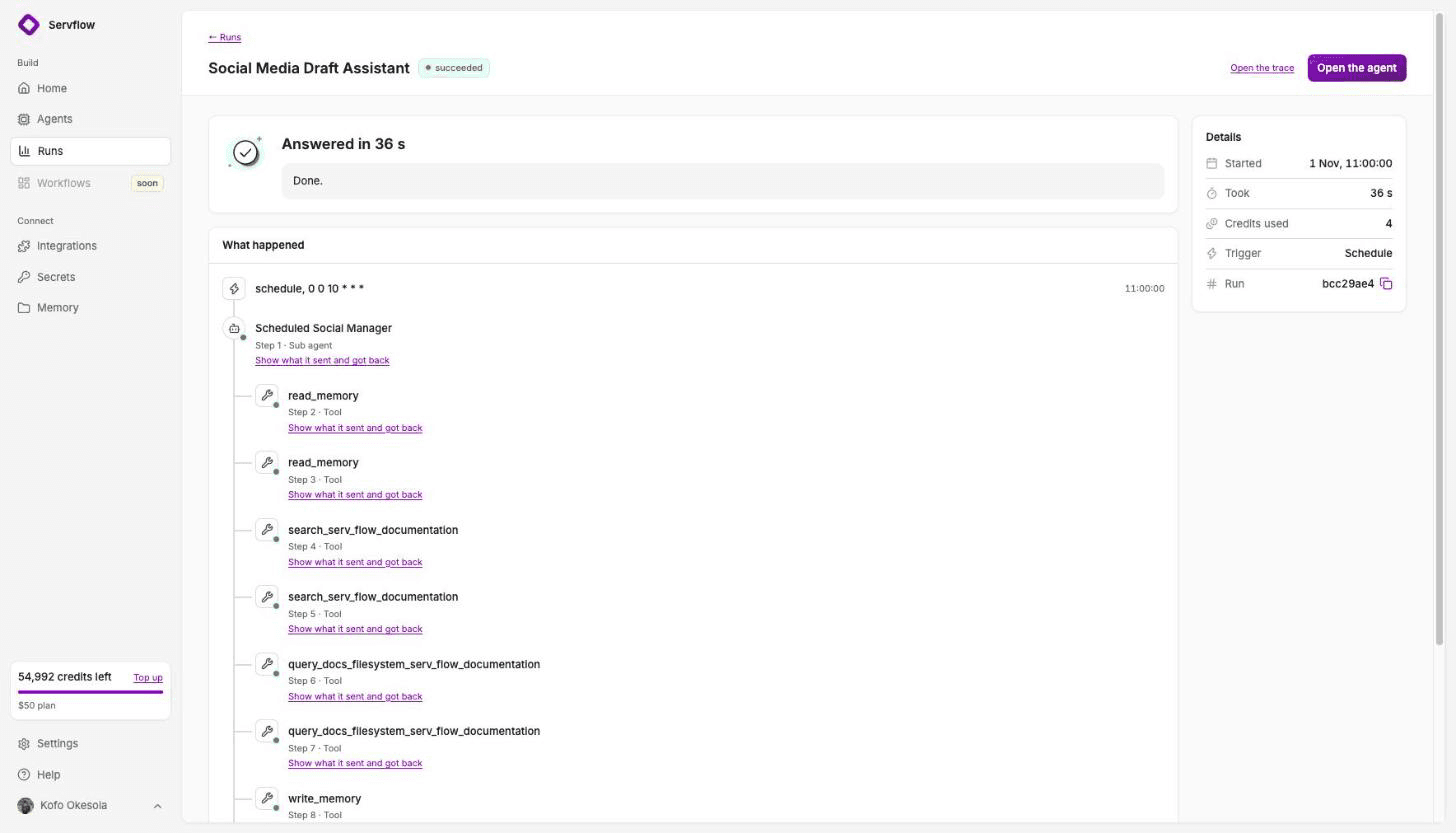
Install one, connect the apps it names, and run a test. The test streams, and the trace shows what each step did and what the run cost. Enable sets the schedule or the inbox, and the automation runs without you.
If no template fits, describe the job in a sentence. Servflow drafts the automation: trigger, steps, the sub agent that calls the model, and the tools it needs. You read it, change what is wrong, and test.
Moving a workflow
n8n exports a workflow as JSON. Servflow does not import it, but it tells you everything you need.
- Move the workflow that only one person understands. That is the dependency you are removing.
- Read the JSON as a spec. The trigger node, the apps it touches, and what the AI node was asked. That is three lines.
- Start from a template. Open Templates on Servflow and pick the job. Gmail Triage, Meeting Follow-ups, Notion Answers on Telegram, Team Memory Bot.
- Add the integrations and paste the instructions. Connect the apps once. What the AI node was asked goes into the sub agent's instructions.
- Test, read the trace, enable. Enable sets the schedule and your monthly cap. Credits stop at zero; nothing is billed past your plan unless you top up.
FAQ
What is the easiest n8n alternative for non-developers? Servflow, for automations with AI in them: start from a template, add your integrations, test, enable. For a visual canvas without code, Zapier is the simplest and Activepieces is the open-source option.
Is n8n free? The Community Edition is free to self-host under n8n's Sustainable Use License, for your own internal business use. n8n Cloud, where n8n runs it for you, starts at about €20 a month billed annually for 2,500 executions.
What happens when n8n Cloud hits the execution limit? Starter and Pro are capped: n8n's pricing page says they have no overages, so nothing more runs that month once the executions are spent. Only the Business plan keeps running past its limit, at a per-execution charge.
Can Servflow do what n8n does? For jobs with a judgement in them, inbox triage, follow-ups, reports, team Q&A, yes, and without the canvas work. For arbitrary data pipelines with code nodes, custom HTTP logic and hundreds of integrations, no. n8n is the more capable tool for a developer.
How do I move an n8n workflow to Servflow? n8n exports a workflow as JSON, which Servflow does not import. Read it as a spec: the trigger, the apps it touches, what the AI node was asked. Start from the closest Servflow template, add the same integrations, paste the instructions, test, read the trace, enable.
Start free
Start from a template, add your integrations, and enable it. 4,000 credits free, no card. From $10 a month, AI at cost.
Related: Zapier alternatives for small teams · Make alternatives · Relay.app has shut down · Team Memory Bot template · What an AI automation costs per run · Pricing