 Servflow
 Kofo Okesola
I ran two Zaps on the Professional plan: one that read new signups and drafted a welcome email, one that posted a daily summary to Slack. The 750 tasks were gone on day nine. The welcome Zap had an AI step at three tasks a run, and every tool call inside it added more.
That is the Zapier experience in one line: every new automation makes you check the task count.
You did not pick Zapier because it was cheap. You picked it because it worked in an afternoon, and it did. The trouble started when the automations got useful enough to run often, and when you put AI steps in them. This page is for that moment: who should stay, who should move, and to what.
What I noticed
- The task count runs out faster than the plan page suggests. A task is a successful action step. Triggers, filters and formatters are free, but an AI step is one, three or five tasks by model tier, and tool calls inside it are billed at the same rate. My five-step welcome Zap cost seven tasks a run.
- The overage is the part nobody plans for. With pay-per-task on, tasks past the limit are billed at a higher rate that Zapier shows only in your billing settings, with a hard stop at three times the plan's task limit. With it off, the Zaps stop. I tried both; neither is what you want on a Tuesday.
- You find out at the end of the month. The cost of a run depends on what the model decided to do, and the dashboard does not show a run's cost as a number.
Who should stay with Zapier
Stay if your automations move data between apps and do not think. "When a form comes in, add a row, post to Slack" is what Zapier was built for, and nothing is easier. Stay if you depend on an app only Zapier connects to. Stay if your usage is under 750 tasks a month and the Professional plan at $29.99 covers it; at that volume the alternatives save you little and cost you a rebuild.
Move if the task count is the thing you watch, or if your Zaps have AI in them.
Three alternatives
Servflow is ours and it comes first. The other two are the honest picks for the jobs Servflow is not built for.
Servflow, for automations with AI in them. Servflow is AI automation that runs on your schedule, inbox, Slack or GitHub. Each automation runs as one agent, from $10 a month with AI at cost. The pricing is the opposite of Zapier's: you pay the model's price for the AI, plus 4 credits a run, and every run shows what it cost on its trace. Credits stop at zero; nothing is billed past your plan unless you top up. The trade-off is the app list. Servflow connects to 17 apps through its integrations catalog, plus GitHub, Telegram, Discord, HTTP webhooks, cron and MongoDB. If your automation lives in apps outside that list, it is not the move.
Make, for data moving at a lower price per step. Make's Core plan is about $9 a month billed annually, or $10.59 monthly, for 10,000 credits, and most actions cost one credit. For "move this field to that app" work it is several times cheaper than Zapier. The trade-off is that the canvas asks more of you, and errors and loops consume credits. We cover that in Make alternatives.
Activepieces, the open-source middle. Activepieces Plus is $20 a month for 10,000 credits, and a run is one credit however many steps it has. AI steps cost 2, 10 or 20 credits by model. You can also self-host it. The trade-off is a smaller app list than Zapier and a younger product.
Side by side
Monthly billing where it exists.
| Servflow | Zapier | Make | Activepieces | |
|---|---|---|---|---|
| Entry paid plan | $10 a month, 10,000 credits | $29.99 a month, 750 tasks ($19.99 billed annually) | $10.59 a month, 10,000 credits ($9 billed annually) | $20 a month, 10,000 credits |
| Unit | A run is 4 credits plus the AI at cost | A task per successful action step | A credit per module operation | A credit per run |
| AI steps | Billed at cost in credits, with the cost shown on each run | 1x, 3x or 5x tasks by model, plus tool calls | Via modules, each an operation | 2, 10 or 20 credits by model |
| Failed runs | Counted at the run fee | Not counted | Not listed as free | Counted |
| Over the limit | Stops at zero; top up $1 per 1,000 | Stops, or a higher task rate to a 3x cap | Scenarios stop; extra credits in bundles of 1,000 or 10,000 at the plan rate | $0.007 a credit |
| Free plan | 4,000 credits once, no card | 100 tasks a month | 1,000 credits a month | 1,000 credits a month |
| Apps | 17 catalog apps plus GitHub, Telegram, Discord, HTTP, cron, MongoDB | Thousands | Over a thousand | Hundreds |
How the cost works on Servflow
One example, with illustrative numbers. An inbox triage automation reads a new email, decides whether it needs a reply, drafts one, and messages you on Discord if it is urgent. On a small model that is about 30 credits a run: 4 for the run, the rest for the AI at what the model costs. Three hundred emails a month is about 9,000 credits, inside the $10 plan.
The same job on Zapier is a trigger, an AI step at 3x tasks, a draft action and a Discord action: five tasks a run, 1,500 tasks a month, twice the Professional plan's 750.
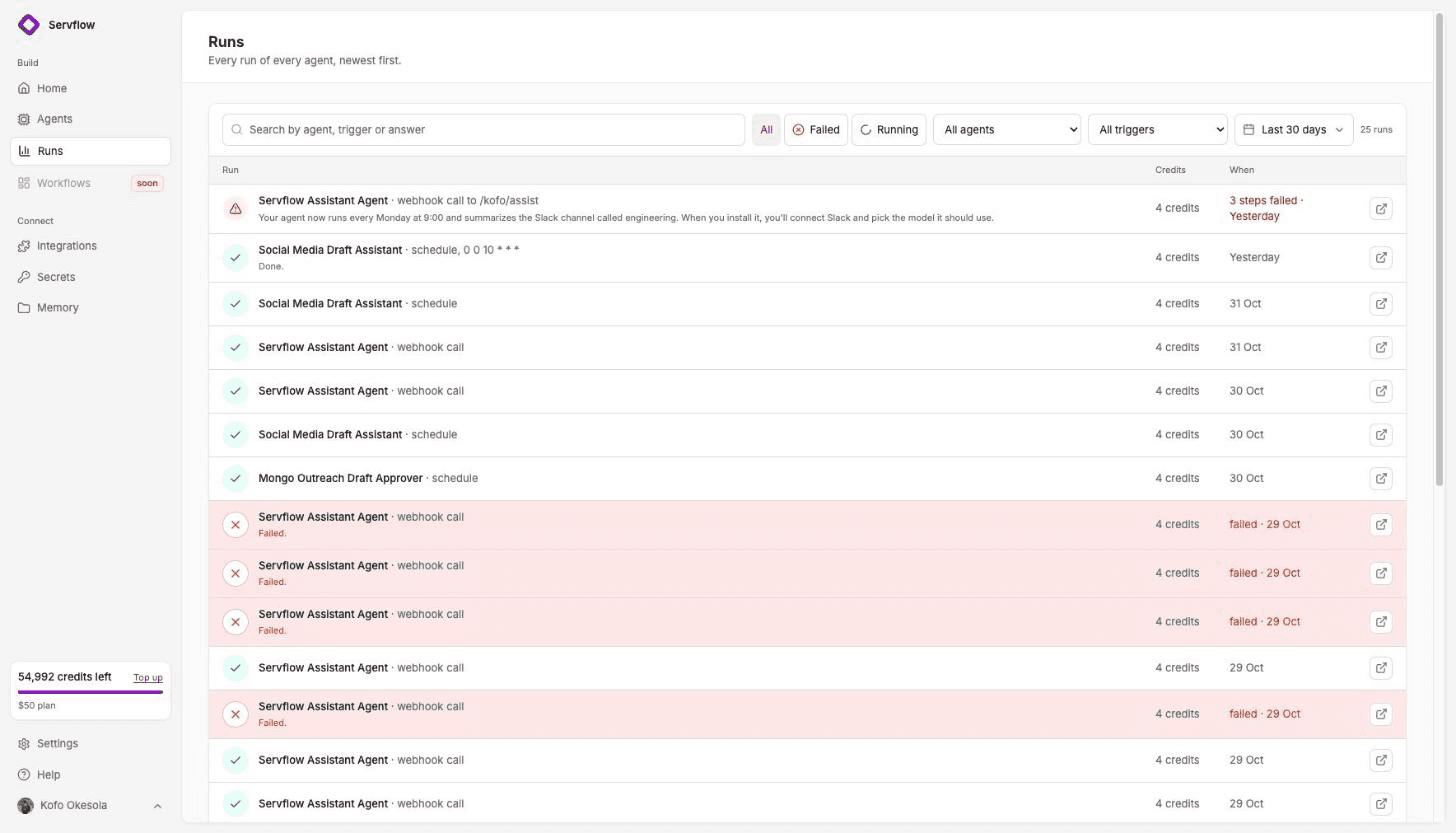
The point is not that one is always cheaper. It is that on Servflow the cost of a run is a number you can see, and the bill cannot pass your plan without you topping it up.
Moving a Zap
Zapier has no export. The Zap's steps are your spec.
- Pick the Zap you check most often. The one that eats tasks is the one that pays for the move.
- Start from a template. On Servflow, open Templates and pick the job: Gmail Triage, Meeting Follow-ups, Outreach Drafts. The trigger and the actions are wired.
- Add the same integrations. Gmail, Slack, Notion, HubSpot and the rest connect once and are shared by every automation on your team.
- Paste the instructions. Whatever your AI step's prompt said goes into the sub agent's instructions.
- Test, read the trace, enable. The test streams. The trace shows each step and the run's credits. Enable sets the schedule or inbox and your monthly cap.
FAQ
What is the cheapest Zapier alternative for a small team? For automations with AI steps, Servflow from $10 a month with AI at cost. For plain data moving, Make's Core plan at about $9 to $10.59 a month for 10,000 credits, or Activepieces Plus at $20 a month for 10,000 credits where a run is one credit.
Why does Zapier use so many tasks? Every successful action step is a task. Triggers, filters, paths and formatters are free, but an AI step costs one, three or five tasks depending on the model, and tool calls inside it add more. A five-step automation with one AI step can cost seven or eight tasks a run.
Does Zapier charge for failed runs? No. Zapier counts a task only when a step completes successfully. The risk is the opposite: with pay-per-task on, a busy month is billed at a higher per-task rate, which Zapier shows only in your billing settings, up to a hard stop at three times your plan's task limit.
Is Servflow a Zapier replacement? For automations that need a judgement call, such as reading an email and deciding what to do, yes. For connecting two of the thousands of apps Zapier supports with no AI in between, Zapier or Make is still the easier choice. Servflow connects to 17 apps through its integrations catalog plus GitHub, Telegram, Discord, HTTP, cron and MongoDB.
How do I move a Zap to Servflow? Start from the Servflow template closest to the job, add the same integrations, paste the Zap's instructions into the sub agent, run a test and read the trace, then enable it on the same schedule or inbox. Zapier has no export, so the Zap's steps are the spec.
Start free
Start from a template, add your integrations, and enable it. 4,000 credits free, no card. From $10 a month, AI at cost.
Related: Make alternatives · n8n alternatives if you do not code · Relay.app has shut down · Gmail Triage template · What an AI automation costs per run · Pricing